
Extensions
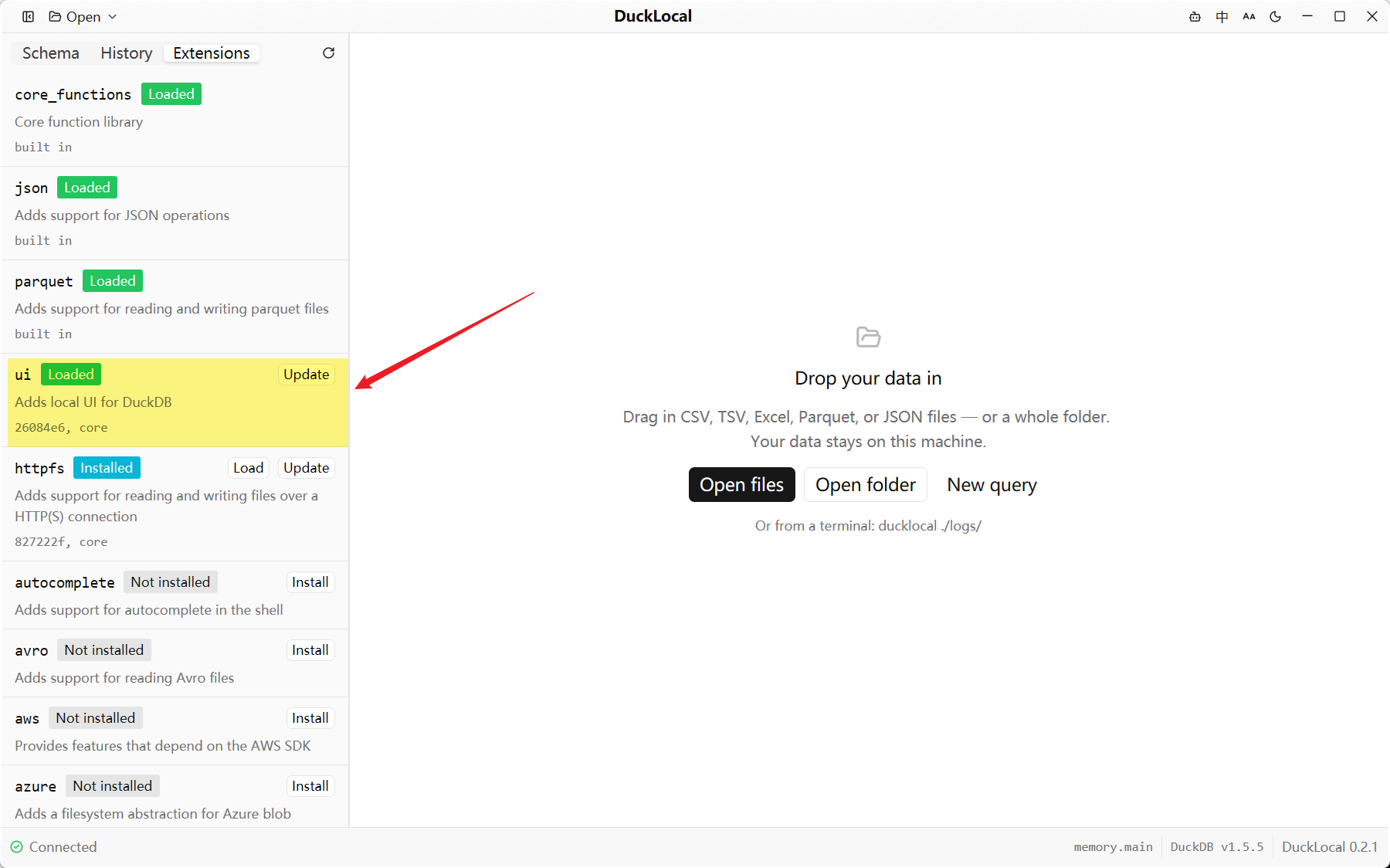
The sidebar's Extensions tab lists every DuckDB extension the engine knows of: loaded ones first, then installed ones, then the rest, each group by name.
Each row shows:
- the extension's name and a status tag: Loaded, Installed or Not installed;
- DuckDB's one-line description of it;
- its version and where it came from: built in, or the repository it was installed from (
core,community, or a URL).
What the statuses mean:
| Status | Meaning |
|---|---|
| Loaded | Active in the current connection: its functions, readers and types work in queries now |
| Installed | Downloaded to this machine, but not loaded in this connection |
| Not installed | Known to DuckDB, but not on this machine yet |
Built in extensions are compiled into DuckLocal — parquet and json among them, both loaded from the start. They are never installed or updated.
Community extensions
DuckDB lists a community extension only once it is installed, so the tab shows a few useful ones before that, tagged Community:
| Extension | Does |
|---|---|
mssql | Attach Microsoft SQL Server and Azure SQL databases over TDS |
gsheets | Read and write Google Sheets |
bigquery | Attach Google BigQuery projects and query them |
read_stat | Read SAS (.sas7bdat, .xpt), SPSS (.sav) and Stata (.dta) files |
h3 | Uber's H3 hexagonal geospatial index |
crypto | Cryptographic hash functions and HMAC |
To install any other community extension, type its name in the box at the top of the tab (Community extension name). A name is lowercase letters, digits and _. Community extensions install with INSTALL name FROM community, from community-extensions.duckdb.org. They are third-party code that DuckDB signs but does not review; the install button's tooltip says so. If the repository has no build of an extension for this DuckDB release, the notification says that rather than showing the raw HTTP error.
A row offers the actions that apply to it:
| Button | Shown when | Runs |
|---|---|---|
| Install | Not installed | INSTALL name |
| Load | Installed, not loaded | LOAD name |
| Update | Installed from a repository | UPDATE EXTENSIONS (name) |
- Install and Update download from DuckDB's extension repository, so they need the network. Load reads the installed file and does not.
- Installing does not load. Click Load afterwards, or run
LOAD name. - An installed extension stays installed: it is a file on disk, in DuckDB's own extension folder. Loading lasts only for the current connection.
- That folder is per DuckDB release (
~/.duckdb/extensions/v2.0.1/…). When an update moves DuckLocal to a new DuckDB release, the extensions you had show as Not installed until you install them again. - One action runs at a time; the other buttons are disabled meanwhile. A notification says Installed …, Loaded … or Updated …, or why it failed.
- After a load or an update, the schema tree is reloaded, since an extension can bring tables and functions with it.
The list is read from duckdb_extensions() each time the tab opens, after each action, when the connection changes while the tab is open, and when you click the refresh button beside the tabs (Refresh extensions). So it also shows an extension loaded another way — by a LOAD typed in a query tab, or by DuckDB on its own.
Load automatically
DuckDB keeps a LOAD for one connection only, and loads by itself only the extensions it builds in or knows from its core repository. So when you load one from the community repository, another repository or a file — with Load or a LOAD typed in a query tab — DuckLocal remembers it and loads it again each time it opens a database: at launch, when you open another database, for a new in-memory database and after Save as database.
Such rows carry a Load automatically checkbox, ticked once you load the extension. Untick it to stop; it takes effect at the next connection, since DuckDB can't unload an extension. Nothing is downloaded: LOAD never installs. If a remembered extension no longer loads (it was removed, or built for an older DuckDB), a notification names it and it stays on the list, so it loads again once you reinstall it.
Neither the window nor the CLI automatically downloads a missing extension when a query needs it. Install it explicitly in Extensions or with INSTALL name. Extensions already installed on this machine can still load automatically.
GPU engine: Sirius
Sirius runs DuckDB queries on an NVIDIA GPU. It is a core extension since DuckDB 2.0.1, built for Linux only (glibc, x86-64 and arm64), so the tab lists it only on Linux. Elsewhere it is not listed, and typing sirius to install it says why.
- The download is large: about 700 MB, which can take minutes; the Install tooltip says so. The first Load also downloads the CUDA backend that matches your driver, from the community repository.
- It must be loaded: it adds no functions, it takes over queries, so no query loads it on its own. Without
LOAD siriusevery query runs on the CPU without saying so. Once you load it, it gets the Load automatically box and loads at every connection.
Open the DuckDB UI
The DuckDB UI — DuckDB's own browser notebook, built by MotherDuck — is an extension like any other, so it runs inside DuckLocal too:
On the Extensions tab, click Install on the
uirow, then Load.In a query tab, run:
sqlCALL start_ui();Your browser opens the UI at
http://localhost:4213. To start the server without opening a browser, runCALL start_ui_server();instead.
The UI runs on the DuckDB instance it was started from, which here is DuckLocal's. Some things to know:
- It needs the network. Installing
uidownloads it, like any extension. And each time it starts, the extension's local server fetches the UI's own files fromhttps://ui.duckdb.org. Your queries and data still run locally. - It lives as long as DuckLocal does. Quitting DuckLocal closes its DuckDB instance, and the server with it.
CALL stop_ui_server();stops it sooner. - Notebooks are saved by the extension, not by DuckLocal, in
~/.duckdb/extension_data/ui/. DuckLocal's query history does not include what you run in the UI. - It cannot run directly on a read-only database. Attach that database from a notebook with
ATTACH '…' (READ_ONLY)instead.
DuckDB UI vs DuckLocal compares the two and covers when to use which.