 DuckLocal
In March 2025, DuckDB 1.2.1 shipped with the DuckDB UI: run duckdb -ui and a notebook opens in your browser, backed by the DuckDB process on your own machine. Since then, the most common question I get about DuckLocal is some version of “why not just use the DuckDB UI?”
It is a fair question. Both tools run DuckDB locally, neither needs a server you manage, and both keep your queries and data on your computer. But they start from different places, and that difference decides which one fits a given job. This article is my honest attempt to lay that out — including the cases where I would reach for the DuckDB UI myself.
1. The short answer
| If you… | Use |
|---|---|
| already work in the DuckDB CLI or Python and want a visual view of that session | DuckDB UI |
| think in notebooks of SQL cells | DuckDB UI |
| use MotherDuck or want to share results through it | DuckDB UI |
| start from a pile of CSV, Parquet, JSON or Excel files and folders | DuckLocal |
| need to work offline, or want every part of the tool installed and reviewable | DuckLocal |
| want charts and dashboards you can save as files and keep in git | DuckLocal |
| want an AI agent to query the same data from a terminal | DuckLocal |
| want both on the same data | DuckLocal, then CALL start_ui(); |
2. What the DuckDB UI is
The DuckDB UI is built and maintained by MotherDuck and delivered as a DuckDB extension called ui. You start it with duckdb -ui from the terminal, or with CALL start_ui(); from any DuckDB client — the CLI, Python, Java and so on.
The extension starts an HTTP server on localhost (port 4213 by default) inside the DuckDB process that called it, and opens your browser. Because the UI talks to that very process, it sees everything the process sees: its attached databases, its memory and your local files.
What you get in the browser:
- Notebooks — named, saved collections of SQL cells, with syntax highlighting and autocomplete. A cell can hold several statements.
- An attached-database browser with a table summary: row count, columns, types and a per-column profile.
- A Column Explorer that summarizes a result and lets you drill into each column.
- Optional MotherDuck sign-in, to persist tables in MotherDuck's cloud warehouse and share them. It is opt-in; by default nothing leaves your machine.
Two details matter for the comparison. First, the extension's local server fetches the UI's own frontend files from https://ui.duckdb.org so the interface stays up to date; your queries still run locally, but the UI itself is loaded from the network. Offline use was not supported at launch. Second, the extension is MIT-licensed, while at launch the frontend's source was not published.
Sources: DuckDB UI announcement · UI extension documentation · duckdb/duckdb-ui on GitHub. Check them for changes made after this article was written.
3. Side by side
| Dimension | DuckDB UI | DuckLocal |
|---|---|---|
| What it is | A browser notebook served by DuckDB's ui extension | A native desktop app with DuckDB embedded |
| How you start it | duckdb -ui or CALL start_ui(); from any DuckDB client (1.2.1 or later) | Open the app, or run ducklocal ./data/ |
| Where queries run | In the DuckDB process that started it, on your machine | In DuckLocal's embedded DuckDB, on your machine |
| Interface files | Fetched from ui.duckdb.org by the local server | Ship with the app |
| Offline | Needs network for the UI files | Works offline; the network is used only for S3, map tiles, extension installs and update checks you turn on |
| Bringing in data | SQL: read_csv, ATTACH, or what the session already has | Drag in files, folders and glob patterns; they become views and are there on the next launch |
| Way of working | Notebooks of SQL cells | Query tabs, a schema sidebar, history, EXPLAIN and a profiler |
| Exploring results | Table summaries and the Column Explorer | Results grid, a per-column Overview tab and built-in charts |
| Reuse and sharing | Saved notebooks; optional MotherDuck sharing | Plain-text .dash dashboards you can review and keep in git, with plot comments |
| AI agents | Not its focus | ducklocal CLI with bounded JSON and an official agent skill |
| Source | Extension under MIT; frontend not published at launch | Apache-2.0, app and source on GitHub |
| Platforms | Wherever DuckDB runs, except windows_arm64 | macOS on Apple silicon, Windows x64, Linux x86_64 |
The shortest way I can put it: DuckDB UI is a window onto a DuckDB session you already have. DuckLocal is the session, built around the files you want to look at.
4. When to use the DuckDB UI
You already live in DuckDB
If your work happens in the DuckDB CLI or a Python script, the UI is one command away and needs no new app. Run duckdb -ui my.duckdb, or call start_ui() from the Python process that has already loaded and transformed your data, and you are looking at exactly that state. DuckLocal cannot see inside another process; the UI is designed to.
You think in notebooks
Some analysis is a long sequence of steps you want to keep in order: load, clean, join, check, summarize. Notebooks with named, saved cells suit that well, and a cell can run several statements at once. DuckLocal's query tabs are better for asking many separate questions than for keeping a long narrative.
You use MotherDuck
If your team already shares data through MotherDuck, the UI is the natural front end: sign in and the same notebook reaches both local DuckDB and your cloud warehouse. DuckLocal has no cloud service and does not plan one.
DuckLocal has no build for your machine
DuckLocal ships for macOS on Apple silicon, Windows x64 and Linux x86_64. On an Intel Mac, for example, you would have to build DuckLocal from source, while the DuckDB UI runs anywhere DuckDB does (except Windows on ARM).
5. When to use DuckLocal
You start from files, not from SQL
Drag in a CSV, a folder of Parquet files or a pattern like ./logs/2026-*/*.json, and each one is a view you can query, with its columns in the sidebar. Every non-empty sheet of an Excel workbook becomes a table. Nothing has to be written as read_csv(…) first, and the files are still there next time you open the app.
You need it to work offline, or to be fully reviewable
DuckLocal's interface is part of the app you installed. It does not load interface code at runtime, it does not download extensions on its own, and update checks are off until you turn them on. The DuckDB UI's frontend, by contrast, is fetched when the UI starts, and it can read the data loaded into DuckDB — the DuckDB documentation itself advises pointing it only at a URL you trust. For most people that is fine. For security reviews, audits, regulated data or air-gapped machines, “everything is installed and open source” is the stronger guarantee.
You want charts and dashboards as files
Results turn into bar, line, scatter, pie and map charts in place. When a view is worth keeping, a .dash file describes its queries, plots and filters as plain text — something you can diff, review in a pull request and validate with ducklocal check.
You work with an AI agent
The ducklocal CLI gives an agent a schema-first, one-statement SQL workflow with bounded JSON output, and dashboard comments let you hand it a question about a specific chart. The same files are open in the app for you to check its work.
6. Run the DuckDB UI inside DuckLocal
You do not have to choose. The DuckDB UI is an extension, and DuckLocal can load DuckDB extensions — so the UI runs on top of DuckLocal's own DuckDB instance:
- Open the Extensions tab in DuckLocal's sidebar.
- Click Install on the
uirow, then Load. DuckLocal never installs extensions on its own, so this step is deliberate. - In a query tab, run:
CALL start_ui();
Your browser opens the DuckDB UI at http://localhost:4213. It is attached to the DuckDB instance DuckLocal is running, so the files you opened in DuckLocal are there to use in a notebook.
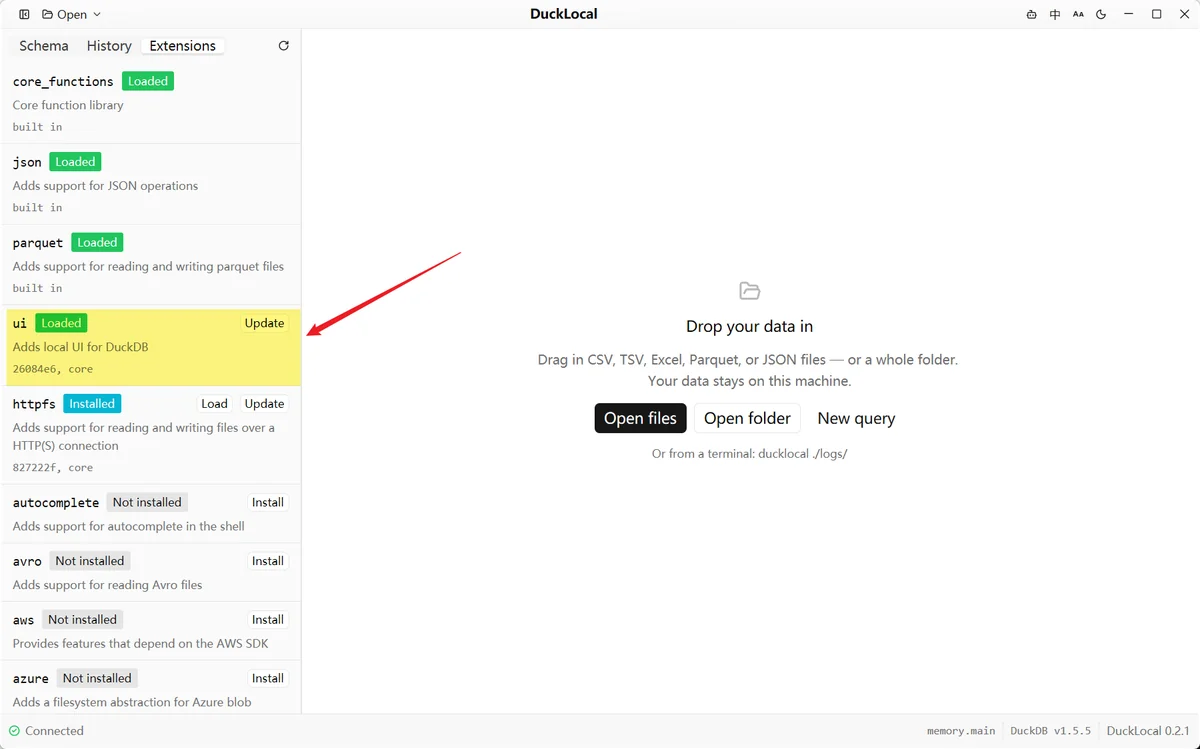
ui extension loaded on DuckLocal's Extensions tab. From here, CALL start_ui(); opens the DuckDB UI on the same DuckDB instance.A few things worth knowing:
- It needs the network: once to install
ui, and each time it starts, to fetch the UI files fromui.duckdb.org. - It ends with DuckLocal. Quitting DuckLocal closes its DuckDB instance and the UI server with it.
CALL stop_ui_server();stops it sooner, andCALL start_ui_server();starts it without opening a browser. - Notebooks belong to the extension, stored in
~/.duckdb/extension_data/ui/. DuckLocal's query history does not include what you run in the UI. - It cannot run directly on a read-only database. Attach that database from a notebook with
ATTACH '…' (READ_ONLY)instead.
This is how I use them together: DuckLocal to open the data, look at the columns and chart the obvious questions; the DuckDB UI when one question turns into a longer investigation I want to keep as a notebook.
Documentation: Open the DuckDB UI from DuckLocal · Extensions tab
7. FAQ
What is the difference between DuckDB UI and DuckLocal?
DuckDB UI is a browser notebook served by DuckDB's ui extension from whichever DuckDB process starts it. DuckLocal is a native desktop app with DuckDB embedded, built around opening files and folders, charts, plain-text dashboards and a CLI for AI agents. Both run queries locally.
Is DuckLocal a replacement for the DuckDB UI?
No. They overlap in running SQL on local data, but the UI is best as a window onto an existing DuckDB session and DuckLocal as a workspace for files. Since the UI runs inside DuckLocal, you can use both.
Does the DuckDB UI work offline?
Your queries run locally, but the UI's frontend files are fetched from ui.duckdb.org each time it starts, so it needs network access. DuckLocal's interface ships with the app and works offline.
Do my queries go to MotherDuck?
Not unless you sign in to MotherDuck in the UI. By default, the DuckDB UI runs your queries on your own machine, as DuckLocal does.